How to use
OrientationJ is a series of plugins for ImageJ and Fiji, written in plain Java with no dependency to install (see Installation). Open a 2D grayscale image, pick a command, and the result appears — nothing to configure beyond the dialog in front of you. Whatever the command, the computation underneath is the same: the gradient structure tensor is computed over a local window (see Theory) to provide pixelwise directional quantities.
This section describes all the plugins and the color survey they build, how to drive them from a macro, and how to choose the two settings that change the numbers: the analysis scale σ and the gradient. Try them on your own data, or on the 16 test images, whose answer is known.
The user interface
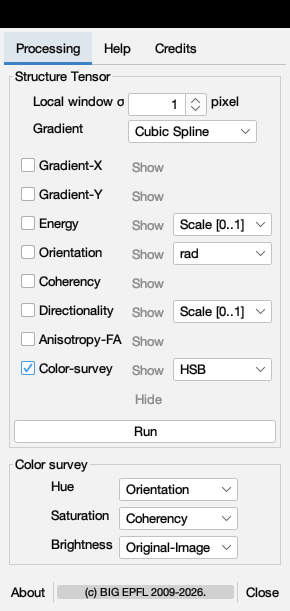
The Analysis dialog, shown here, is representative of all of them. The upper block — Structure Tensor — sets the two settings that change the measurement, σ ("Local window") and the gradient, then selects which feature maps to produce. Energy and directionality are unbounded, so they carry a display scaling: Scale [0..1] for a normalized view, No scale for the raw values you want to measure; coherency and anisotropy are already in [0, 1] and are shown as computed. The lower block builds the color survey — which feature drives the hue, the saturation and the brightness.
Every field has a macro equivalent, so once a setting works it can be recorded with the ImageJ macro recorder and replayed over a whole folder. That is the usual way to go from one exploratory image to a batch of hundreds.